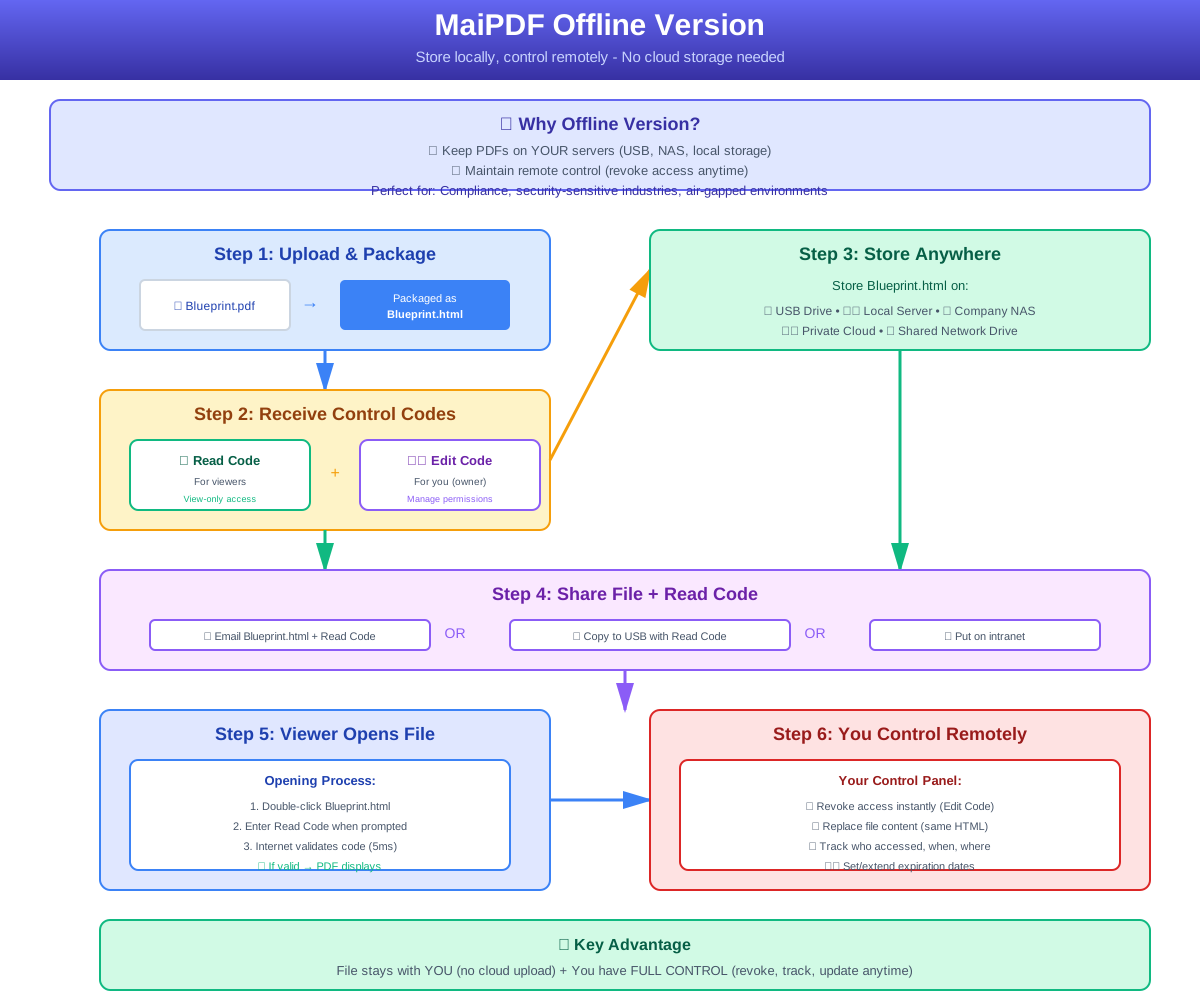
Package PDFs into local HTML, store on USB/NAS anywhere – each opening requires internet verification (5ms), files in your hands + remote control anytime
Key selling point in one sentence: Package PDFs into local HTML, store on USB drives or NAS – each opening requires lightning-fast authorization from the server, ensuring confidentiality and revocability.
| Traditional Approach | Pain Points | Offline Version Solution |
|---|---|---|
| Full Upload to Cloud Drives | Data remains with third parties, high compliance pressure | Files remain only in your hands or internal network |
| Pure Local Encryption | Out of control once sent, cannot be revoked | Each opening requires verification, can be locked at any time |
| Professional DRM Platform | Complex deployment, high costs | One-click HTML generation, affordable for individuals |
PDFs are encapsulated into a single HTML, easily copied to USB drives / private NAS.
Background-level handshake upon opening: verifies reading code, remaining uses, expiration date. Disconnection → direct refusal to launch.
Read Code: View only; Encode: Replace files, add uses. Retain a "regret button" while sharing files.
Each verification request records IP, time, clear at a glance in the background – who has viewed, when it ended, one-click export to CSV.
| Industry / Occasion | Specific Use |
|---|---|
| Hardware Manufacturing Delivery | Package blueprints into HTML to accompany equipment on-site; customer's computer has no internet? Bring your own portable Wi-Fi router to emit a one-time hotspot for verification. |
| Legal and Auditing | Lawyers submit due diligence materials, limit to 5 uses with reading code; after the audit, "terminate authorization" with one click in the background using encoding. |
| Exhibition / Training | Distribute product white papers via USB drive, automatically cache pages after initial verification, can still browse offline for 24 hours after leaving the exhibition hall. |
| University Research | Internally exchange draft papers, files remain on the school's server; external collaborators can scan the QR code for temporary verification to view. |
Upload PDF → Complete encapsulation within 30 seconds.
Number of views, expiration date, whether to lock IP / region.
Get Project_X_Spec.html + simultaneously generate access/edit codes & QR code.
Tips: Write the version number clearly in the file name to facilitate the other party's browser tab display and reduce misreading.
Non-Printable / Disable Copying: Browser-level disabling of print menus, right-click, and shortcuts.
Dynamic Watermark: Automatically overlays date + IP when opened, screenshots can also trace the source.
HTTPS Verification Channel: Authorization handshake uses an encrypted channel to prevent man-in-the-middle tampering.
One-Time Reading Mode: Deduct uses upon opening, invalidates when the window is closed, preventing screenshots and background streaming.
| Item | Description |
|---|---|
| Cost | Personal & small team version is permanently free; ultra-high concurrency can be upgraded to a paid plan (billed by verification count, almost 1% of the cost of traditional DRM). |
| Deployment | No server or local software required; the browser is the reader. |
| Update | If there are new features, re-upload the original PDF to get the new version of HTML; the old package is not affected. |
Must keep the file in your own hands, but want to lock the door at any time?
Choose local HTML offline package.
Want to modify content in real-time and review reading?
Then cooperate with cloud external links for dual-line parallel operation to maximize flexibility.
Find a confidential document ⇢ Upload ⇢ Generate offline package.
Paste the QR code into an email or print a sticker.
Let the other party open and verify on any device – experience the sense of control of "files not on the cloud, permissions closed at any time."
Use the offline version to add an intelligent insurance to your next PDF that cannot be leaked.
Explore in-depth articles, tutorials, and best practices on our professional blog:
Visit MaiPDF Expert Blog