Protect your PDF files for free with MaiPDF’s DRM features, offering download and printing restrictions along with email alerts for access.
Get Started
Apply Digital Rights Management (DRM) to your PDFs for free. Restrict download and printing to ensure your document stays secure.
Receive notifications via email whenever someone accesses your protected PDFs. Keep track of who is viewing your documents.
Share your PDFs with added security and control. MaiPDF is simple to use and completely free, offering features similar to paid services.
MaiPDF offers an easy and secure way to share your PDFs with full control over access:
Step 1: Upload your PDF to MaiPDF’s platform.
Step 2: Apply DRM to restrict downloading and printing of the file.
Step 3: Share your PDF securely with anyone, knowing access is controlled and monitored.
Step 4: Receive email alerts whenever your PDF is accessed, providing full visibility into who’s viewing your document.
MaiPDF offers all of these features for free, making it an excellent solution for personal and professional document security without the cost of other DRM services.
MaiPDF App workflow
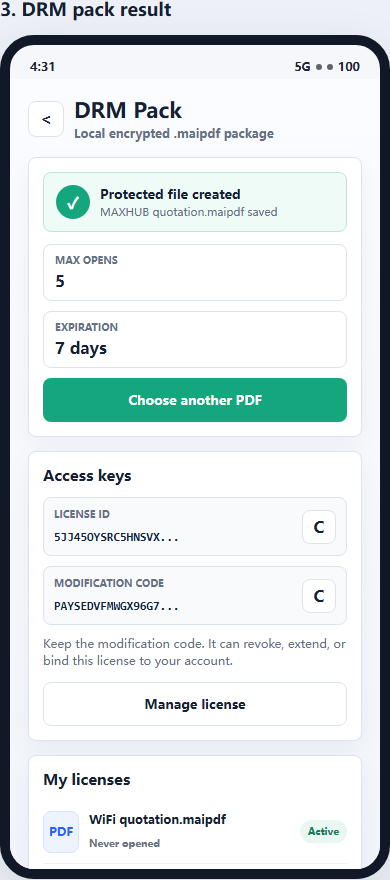
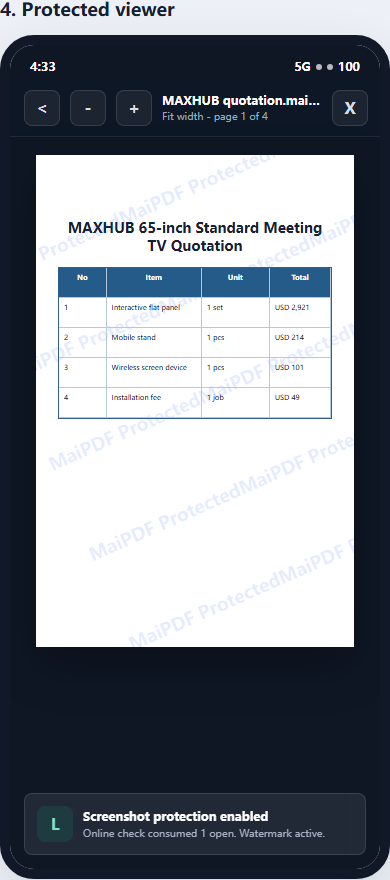
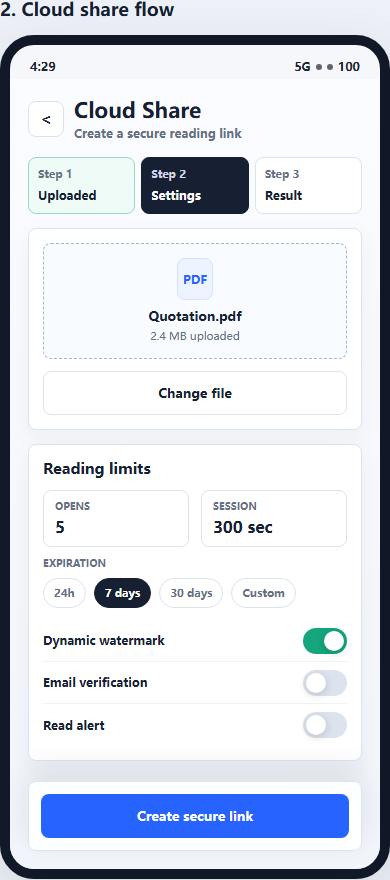
The same MaiPDF product family supports two paths: fast Online Cloud Sharing for browser links, and MaiPDF App / App DRM for stronger file-level control. These App screens show how a PDF can move from upload to DRM packaging and protected viewing.
Use Online Cloud Sharing when you need a quick PDF link, QR code, password, expiry, and access records.
For sensitive contracts, proposals, or internal files, use App DRM to create a protected .maipdf document.
Recipients view the document under controlled conditions instead of receiving an ordinary uncontrolled PDF.
Updated MaiPDF protection path
SendPDFOnline pages now describe MaiPDF as a two-level product family: Online Cloud Sharing creates quick browser links and QR codes, while the MaiPDF App creates protected .maipdf packages for sensitive PDFs that need App DRM controls.
Upload a PDF, share a browser link or QR code, and keep read code / modify code management.
Package the PDF in the MaiPDF App with local encryption, license rules, expiry, open limits, and revoke control.
Use protected viewer, device binding, screenshot-aware controls, watermark trace, and license management where supported.
No web page can fully stop screenshots. MaiPDF App DRM is positioned as the stronger path: reduce casual copying, bind access to identity/devices, revoke licenses, and trace leaks with visible watermark information.