Security Decision Framework
Security Checklist
Access Control
Restrict total opens to prevent unlimited forwarding
Auto-expire links after a deadline
Require a password before viewing
Verify viewer identity with code
Content Protection
Block file saving to local devices
Stop physical copies from being made
Show viewer email/IP on every page
Track views, locations, and devices
Risk Assessment Guide
Low Risk
Marketing materials, public reports, brochures
- View limits (optional)
- Basic analytics
- Expiration date
Medium Risk
Business proposals, client reports, drafts
- Password + view limits
- Dynamic watermarks
- Download prevention
- Access analytics
High Risk
Legal, healthcare, financial, IP documents
- Email verification
- Domain restriction
- All content protections
- Real-time monitoring
- Instant revocation
Industry-Specific Guidelines
Legal
Email verification + domain lock for attorney-client privilege. Audit trail for court compliance. Watermarks on all privileged documents.
Healthcare
HIPAA-aligned access controls. Email verification for patient records. View limits on diagnostic reports. Full access logging.
Finance
Domain restriction for internal reports. Dynamic watermarks on investor materials. Expiration dates on quarterly data. Download prevention.
Frequently Asked Questions
Related Guides
MaiPDF App workflow
From cloud link sharing to protected .maipdf files
The same MaiPDF product family supports two paths: fast Online Cloud Sharing for browser links, and MaiPDF App / App DRM for stronger file-level control. These App screens show how a PDF can move from upload to DRM packaging and protected viewing.
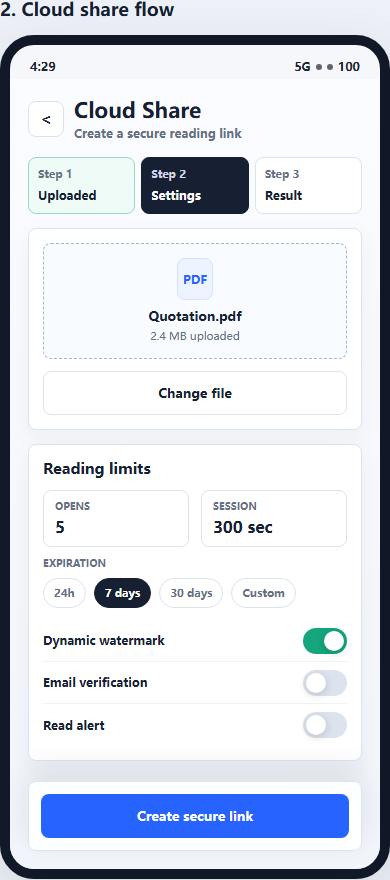
1. Create a cloud share
Use Online Cloud Sharing when you need a quick PDF link, QR code, password, expiry, and access records.
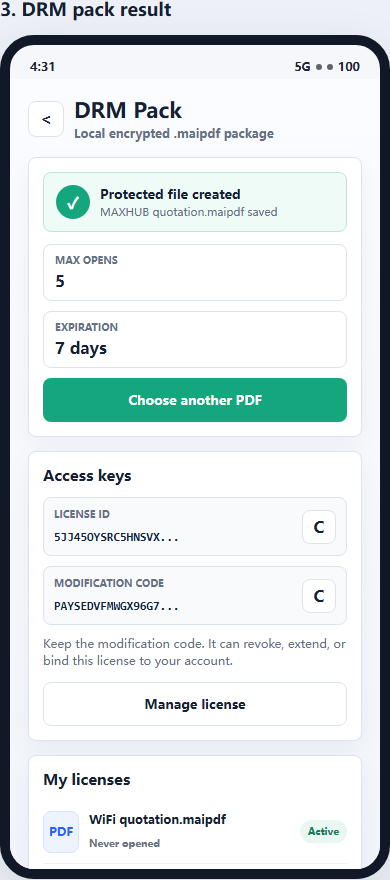
2. Package as .maipdf
For sensitive contracts, proposals, or internal files, use App DRM to create a protected .maipdf document.
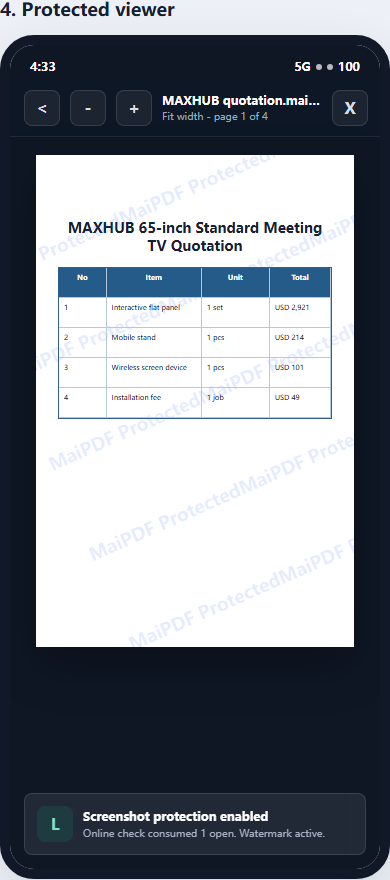
3. Open in protected viewer
Recipients view the document under controlled conditions instead of receiving an ordinary uncontrolled PDF.
Updated MaiPDF protection path
Use Online Cloud Sharing for speed; use MaiPDF App DRM when screenshots, forwarding, or device access matter
SendPDFOnline pages now describe MaiPDF as a two-level product family: Online Cloud Sharing creates quick browser links and QR codes, while the MaiPDF App creates protected .maipdf packages for sensitive PDFs that need App DRM controls.
Upload a PDF, share a browser link or QR code, and keep read code / modify code management.
Package the PDF in the MaiPDF App with local encryption, license rules, expiry, open limits, and revoke control.
Use protected viewer, device binding, screenshot-aware controls, watermark trace, and license management where supported.
No web page can fully stop screenshots. MaiPDF App DRM is positioned as the stronger path: reduce casual copying, bind access to identity/devices, revoke licenses, and trace leaks with visible watermark information.
Start Securing Your PDFs
Apply best practices in seconds. Free. No registration required.
Get Started