Sharing
Share a PDF as a Link (and QR Code)
Upload a PDF, generate a reading link (plus QR code), then control access with view limits, expiration, and optional Read Alerts via Telegram.
Published: Jan 15, 2025 Updated: Apr 13, 2026

Sharing
Upload a PDF, generate a reading link (plus QR code), then control access with view limits, expiration, and optional Read Alerts via Telegram.
Published: Jan 15, 2025 Updated: Apr 13, 2026
How it works
Drag and drop (or click) to upload. No signup required for quick sharing.
Add view limits, expiration, email verification, watermarks, and more.
Send via chat/email/social. Track opens and (optionally) get Telegram Read Alerts.
Result
MaiPDF provides the exact pieces you need to share and keep control later.
Share this link with recipients. They open and read in the browser.
Perfect for posters, booths, printed handouts, and offline distribution.
Keep it so you can replace the PDF or adjust settings later without losing the original link.
Why it’s better
No giant email threads. Update settings anytime without resending files.
See when it was opened, and from what device/browser/location (where available).
View limits, expiration, watermarking, email verification, and restrictions.
Perfect for posters, print handouts, events, and offline-to-online flows.
Get notified when someone opens the link (available when access limit is under 10,000).
Learn more →Update the file behind a shared URL without changing the link recipients already have.
Learn more →
Chat apps, email, internal portals, social posts, and QR codes — a link is flexible, fast, and easy to revoke or update.
FAQ
Yes. You can generate a reading link quickly. Optional advanced controls may depend on the workflow you choose.
Yes. Keep your modification code so you can update the file behind the link later.
Yes. You can use access logs/analytics, and enable Read Alerts via Telegram when available.
Use chat for speed, email for formal delivery, and QR when offline distribution matters. A single link works everywhere.
Generate a link + QR code in minutes, then control access and track opens.
MaiPDF App workflow
The same MaiPDF product family supports two paths: fast Online Cloud Sharing for browser links, and MaiPDF App / App DRM for stronger file-level control. These App screens show how a PDF can move from upload to DRM packaging and protected viewing.
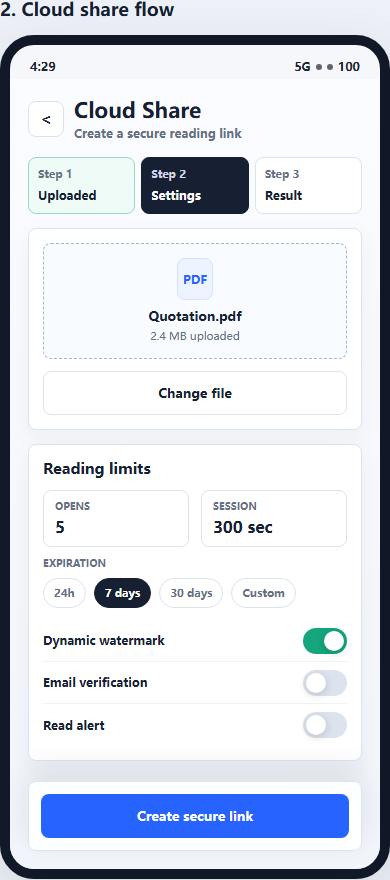
Use Online Cloud Sharing when you need a quick PDF link, QR code, password, expiry, and access records.
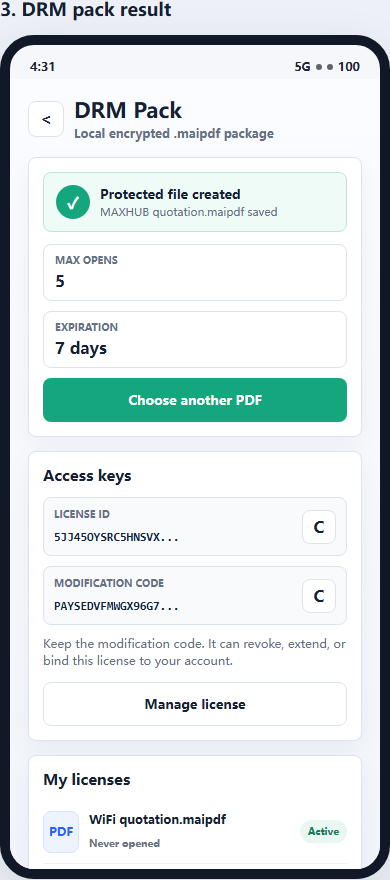
For sensitive contracts, proposals, or internal files, use App DRM to create a protected .maipdf document.
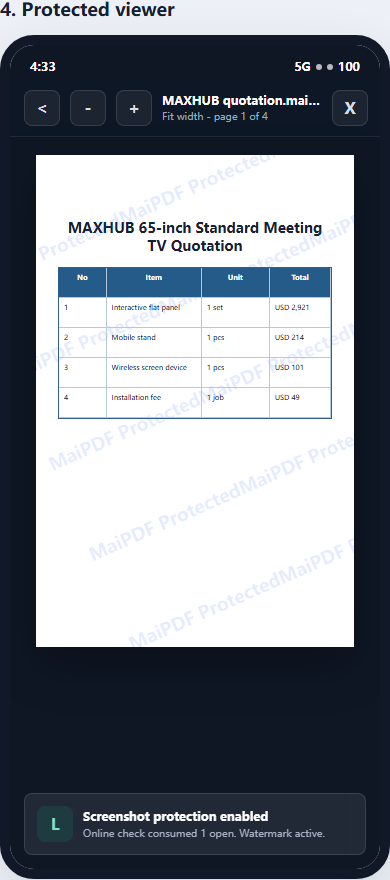
Recipients view the document under controlled conditions instead of receiving an ordinary uncontrolled PDF.
Updated MaiPDF protection path
SendPDFOnline pages now describe MaiPDF as a two-level product family: Online Cloud Sharing creates quick browser links and QR codes, while the MaiPDF App creates protected .maipdf packages for sensitive PDFs that need App DRM controls.
Upload a PDF, share a browser link or QR code, and keep read code / modify code management.
Package the PDF in the MaiPDF App with local encryption, license rules, expiry, open limits, and revoke control.
Use protected viewer, device binding, screenshot-aware controls, watermark trace, and license management where supported.
No web page can fully stop screenshots. MaiPDF App DRM is positioned as the stronger path: reduce casual copying, bind access to identity/devices, revoke licenses, and trace leaks with visible watermark information.