Share PDF Files Online
Securely & Professionally

Upload your PDF and share it instantly with a secure link or QR code. Add password protection, set view limits, prevent downloads, and track every access — all free, no registration required.

Secure Links
Shareable URLs
QR Codes
Instant generation
Access Control
Password + limits
Analytics
Real-time data

Secure PDF Sharing Workflow

From upload to engagement analytics — how MaiPDF sharing works

flowchart LR A[📄 Upload PDF] --> B[⚙️ Security Settings] B --> C[🔒 Password] B --> D[👁️ View Limits] B --> E[🚫 No Download] B --> F[💧 Watermark] C --> G[🔗 Generate Link] D --> G E --> G F --> G G --> H[📱 QR Code] G --> I[📧 Share Link] H --> J[👤 Recipient Opens] I --> J J --> K{Access Check} K -->|✅ Authorized| L[📖 View PDF] K -->|❌ Denied| M[🚫 Blocked] L --> N[📊 Analytics Logged] style A fill:#dbeafe,stroke:#3b82f6 style G fill:#d1fae5,stroke:#10b981 style H fill:#fef3c7,stroke:#f59e0b style L fill:#d1fae5,stroke:#10b981 style M fill:#fee2e2,stroke:#dc2626 style N fill:#e0e7ff,stroke:#6366f1

Professional PDF Sharing Features

Everything you need to share documents securely and professionally

Secure Shareable Links

Generate unique, encrypted links for every PDF. Each link can be configured with its own security settings and revoked at any time.

QR Code Generation

Automatically generate QR codes for any shared PDF. Print them on business cards, flyers, or presentations for instant mobile access.

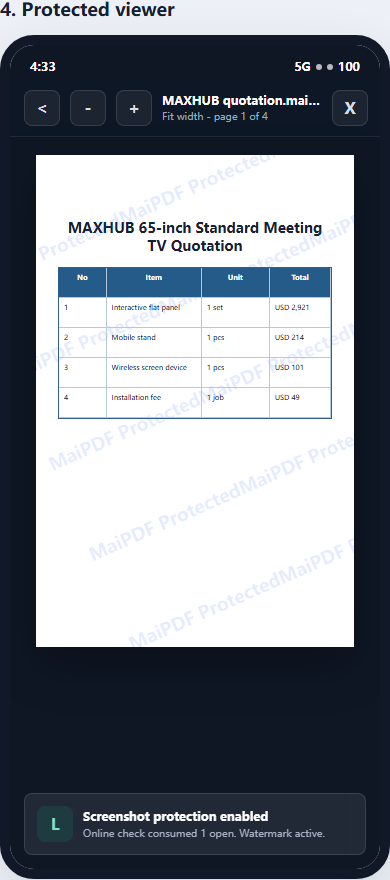
Dynamic Watermarks

Add watermarks that display viewer-specific information to deter unauthorized screenshots and redistribution of your documents.

View Limits & Revocation

Set maximum view counts for any shared document. Once the limit is reached, access automatically stops. Revoke access at any time.

Advanced Analytics

Track every document access with detailed analytics — view counts, device types, geographic locations, timestamps, and engagement duration.

Access Controls

Require passwords, disable downloads, prevent printing, and add email verification before viewers can access your shared PDFs.

How to Share PDFs with MaiPDF

Four simple steps to secure, trackable PDF sharing

1

Upload Your PDF

Drag and drop your PDF file onto MaiPDF. All formats and sizes are supported with instant processing.

2

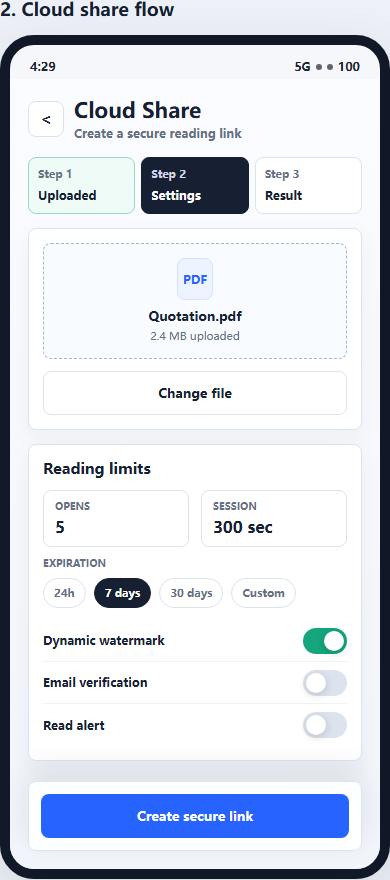
Configure Security

Set passwords, view limits, download restrictions, watermarks, and email notification preferences.

3

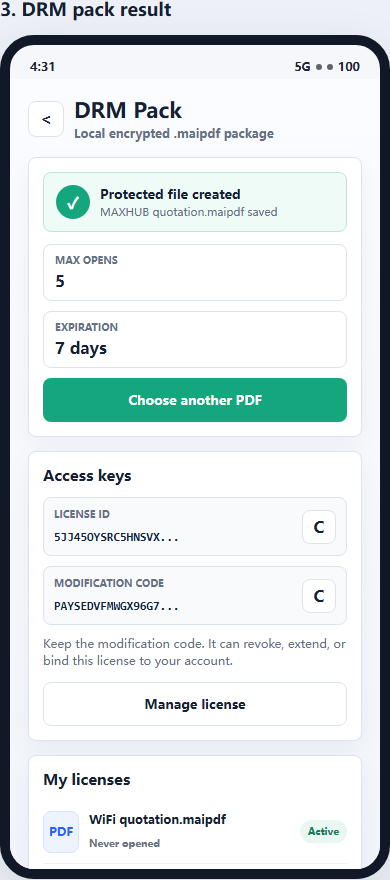
Share Link or QR

Copy the secure sharing link or download the QR code. Share via email, chat, print, or embed anywhere.
MaiPDF upload and security settings interface
Upload & configure sharing settings
MaiPDF sharing result page with link and QR code
Secure link & QR code generated

Professional Use Cases

How professionals across industries use MaiPDF for secure document sharing

Business & Finance

Share client proposals, financial reports, investment portfolios, and confidential business plans with full access control and audit trails.

Creative Professionals

Distribute design portfolios, mockups, brand guidelines, and marketing materials with watermark protection to safeguard intellectual property.

Legal Professionals

Share case documents, client agreements, legal research, and confidential files with view limits and access logs for compliance requirements.

Education

Distribute course materials, exam papers, and study guides to students with view limits to prevent unauthorized redistribution.

Healthcare

Share medical reports, patient records, and clinical research documents securely with password protection and access logging.

Real Estate

Share property listings, floor plans, contracts, and inspection reports with potential buyers via QR codes on signs and flyers.

How MaiPDF Compares

MaiPDF vs. traditional PDF sharing methods

Feature MaiPDF Email Attachments Cloud Storage
Access Control
View Analytics
Dynamic Watermarks
View Count Limits
QR Code Generation
Password Protection
Prevent Forwarding
Free to Use

Frequently Asked Questions

Common questions about secure PDF sharing with MaiPDF

Is MaiPDF secure for sharing confidential documents?

Yes. MaiPDF provides multiple security layers including password protection, view count limits, download restrictions, and dynamic watermarking to keep your confidential documents secure.

Do recipients need a MaiPDF account?

No. Recipients access shared PDFs directly in their browser via a secure link or QR code. No account, registration, or app download is needed. You can optionally require email verification or password entry.

Can I limit how many times a document can be viewed?

Yes. Set a maximum number of views for any shared PDF. Once the limit is reached, the link automatically stops working. This is ideal for sensitive or time-limited materials like proposals and exam papers.

What analytics does MaiPDF provide?

MaiPDF provides detailed analytics including total views, viewer device types, approximate geographic location, access timestamps, and engagement duration for each shared document.

Can I prevent downloading of shared PDFs?

Yes. Disable downloading and printing so recipients can only view the document in their browser. This protects intellectual property and prevents unauthorized redistribution of your files.

Related Guides

Ready to Share Your PDFs Securely?

Upload your PDF, configure security settings, and share with a secure link or QR code — all free, in under 30 seconds.

Share PDF Free Now