Ebook Preview Security Guide

Published: January 15, 2025 | Updated: December 03, 2025

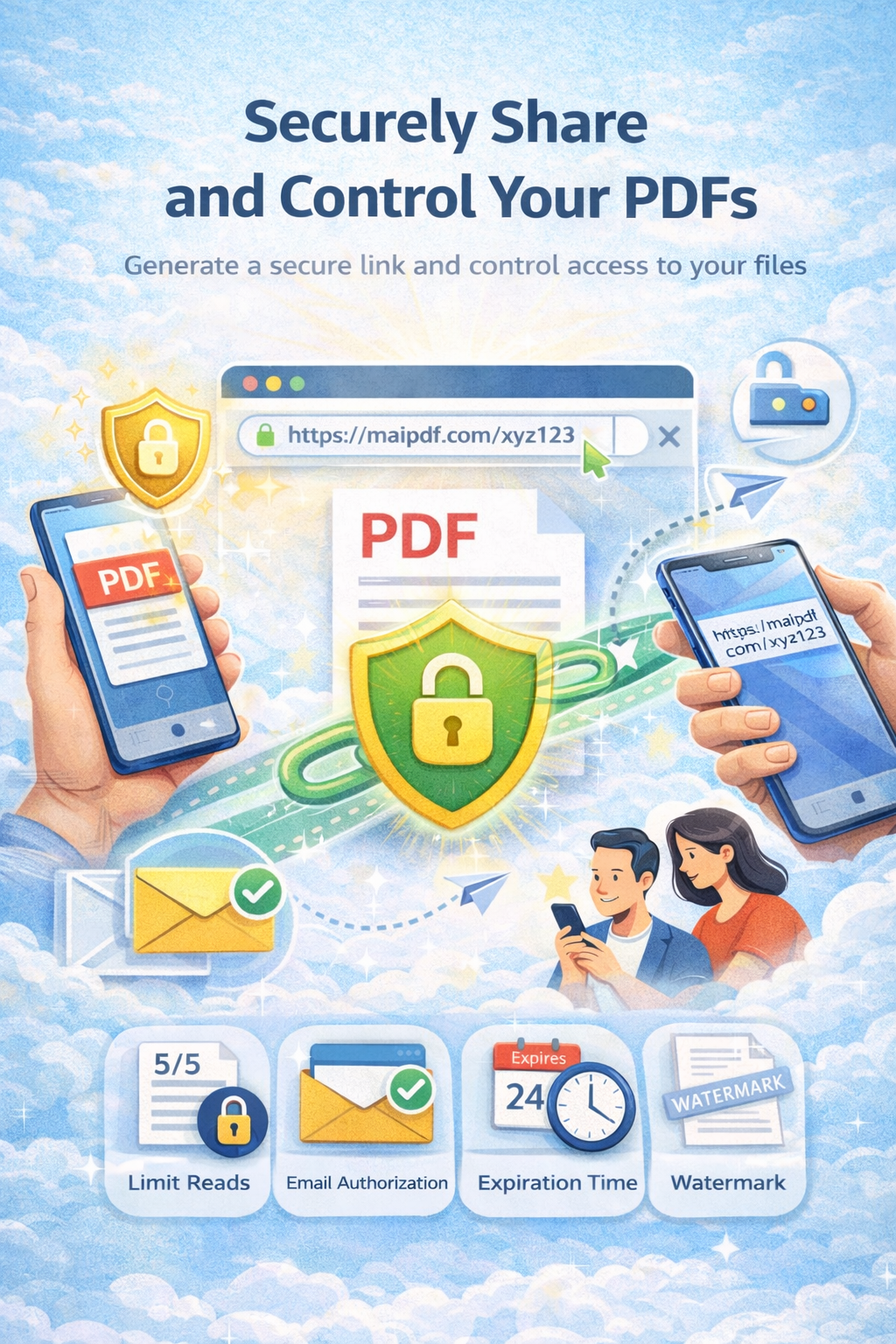
Learn how to share ebook previews securely without allowing downloads. Protect your intellectual property with password protection, view limits, expiration dates, watermarks, and comprehensive tracking analytics. Perfect for content creators, authors, and publishers.

Get Started Free

Why Secure Ebook Previews Matter

For content creators and publishers, offering a preview of your ebook is an essential marketing strategy to attract readers and drive sales. However, traditional preview methods often expose your intellectual property to significant risks:

Unauthorized Downloads

Readers can download the full ebook content, bypassing purchase requirements and causing revenue loss.

Uncontrolled Sharing

Preview links can be shared widely without your knowledge, diluting exclusivity and reducing conversion rates.

Intellectual Property Loss

Once downloaded, you lose control over your content, making it vulnerable to piracy and unauthorized distribution.

No Analytics

Traditional methods provide no insights into reader behavior, engagement, or conversion patterns.

73%

of authors report unauthorized sharing of their ebook previews

45%

increase in conversion rates with secure preview sharing

89%

of publishers prefer secure preview platforms

Advanced Security Features for Ebook Previews

MaiPDF provides comprehensive security features designed specifically for ebook preview protection:

View-Only Mode

Prevent downloads completely. Readers can view your ebook preview online but cannot save, download, or print the content. This ensures your intellectual property remains protected while still allowing potential customers to sample your work.

Password Protection

Add an extra layer of security with password protection. Control who can access your ebook preview by requiring a password. Perfect for exclusive previews for subscribers, newsletter members, or VIP customers.

Expiration Dates

Set automatic expiration dates for your preview links. Access automatically expires after a specified time, ensuring previews don't remain accessible indefinitely. Ideal for limited-time promotional previews or time-sensitive marketing campaigns.

View Limits

Control how many times a reader can view your preview. Set maximum view counts (e.g., 3 views per user) to prevent excessive access while still allowing multiple viewing sessions. This helps maintain exclusivity and encourages faster purchase decisions.

Dynamic Watermarks

Add dynamic watermarks to your ebook preview pages showing the viewer's email, IP address, or custom text. This deters unauthorized sharing and helps identify the source if content is leaked. Watermarks are embedded directly in the PDF viewer.

Comprehensive Analytics

Track detailed analytics on who views your preview, how long they spend reading, which pages they view most, and when they access the content. Use these insights to optimize your marketing strategy and improve conversion rates.

How to Share Secure Ebook Previews: Step-by-Step Guide

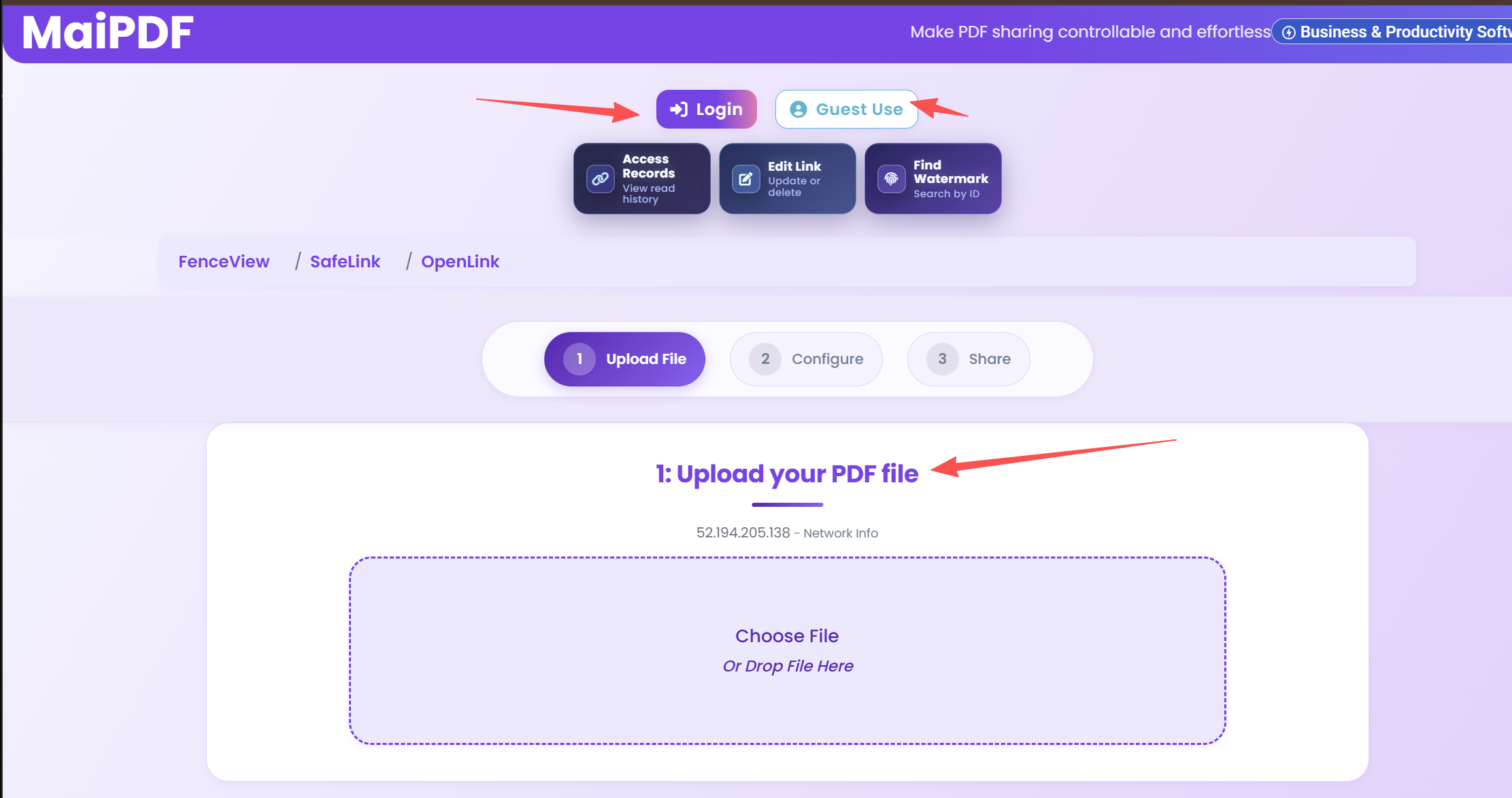
Step 1 Upload Your Ebook Preview

Visit MaiPDF.com and upload your ebook preview PDF. The platform supports files up to 50MB, making it suitable for most ebook previews. You can upload the first chapter, a sample section, or a specially created preview version of your ebook.

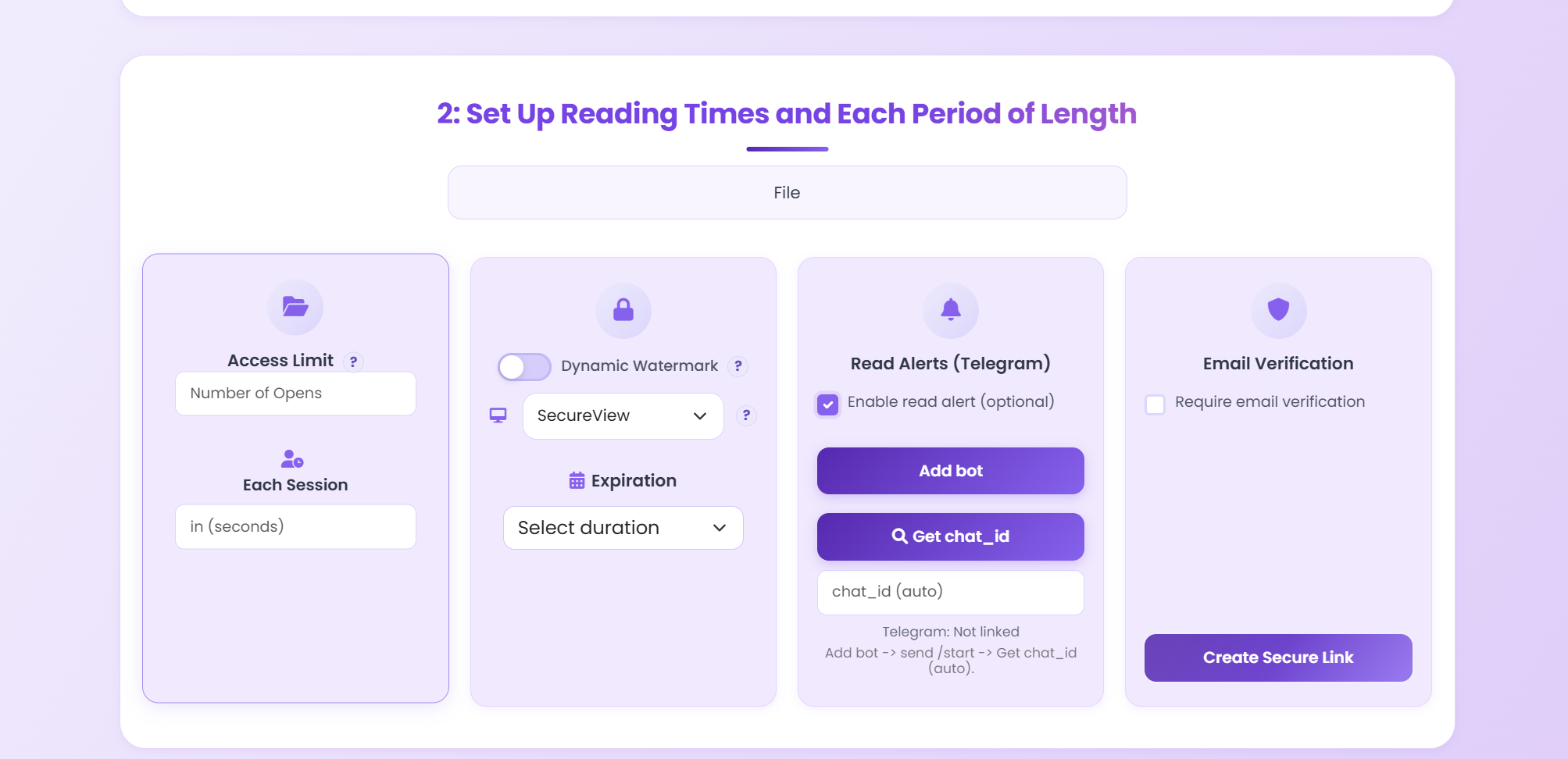
Step 2 Configure Security Settings

Set up your security preferences:

  • Enable View-Only Mode: Disable downloads to prevent readers from saving your content
  • Set Password: Add password protection if you want exclusive access
  • Set View Limits: Limit how many times each reader can view the preview (e.g., 3-5 views)
  • Set Expiration Date: Choose when the preview link should expire
  • Enable Watermarks: Add dynamic watermarks to deter unauthorized sharing

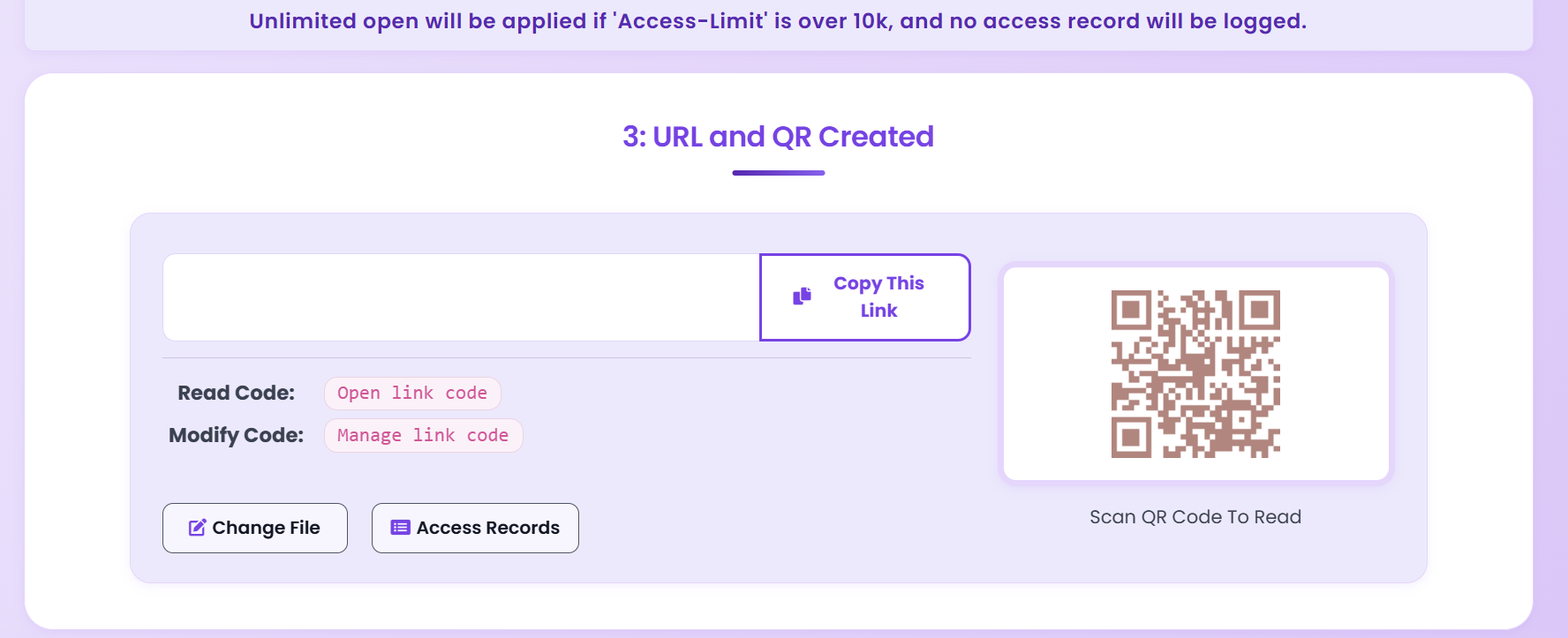
Step 3 Generate Secure Preview Link

After configuring your settings, MaiPDF generates a secure, unique preview link. This link can be shared via email, social media, your website, or embedded in marketing campaigns. The link is protected by all the security settings you've configured.

Step 4 Share Your Preview

Share the secure preview link with your target audience. You can include it in:

  • Email newsletters to subscribers
  • Social media posts and advertisements
  • Your author website or blog
  • Book launch campaigns
  • Review requests to book bloggers

Step 5 Monitor Analytics

Track viewer engagement through MaiPDF's analytics dashboard. Monitor:

  • Total views and unique viewers
  • Average reading time
  • Most viewed pages
  • Geographic distribution of viewers
  • Conversion tracking (if integrated with your sales platform)

Best Practices for Secure Ebook Previews

Preview Content Strategy

  • Show Enough to Hook: Include the first chapter or 10-15% of your ebook to give readers a genuine taste of your content
  • End on a Cliffhanger: Stop at an exciting moment to encourage readers to purchase the full version
  • Include Table of Contents: Show what readers will get in the full ebook to build anticipation
  • Highlight Key Benefits: Use the preview to showcase your ebook's unique value proposition

Security Configuration Tips

  • Balance Security and Accessibility: Don't make previews too restrictive - aim for 3-5 views per user to allow multiple reading sessions
  • Use Expiration Dates Strategically: Set previews to expire after your promotional period ends
  • Enable Watermarks for High-Value Content: Use dynamic watermarks for premium ebooks or exclusive previews
  • Password Protection for VIP Previews: Use passwords for exclusive previews shared with select audiences

Analytics Optimization

  • Track Engagement Metrics: Monitor which pages get the most views to understand reader interests
  • Measure Reading Time: Longer reading times often indicate higher interest and better conversion potential
  • Identify Drop-Off Points: Analyze where readers stop viewing to improve your preview content
  • Test Different Preview Lengths: Experiment with different preview sizes to find the optimal conversion rate

Ebook Preview Use Cases

Self-Published Authors

Share secure previews of your latest ebook with potential readers through your author website, social media, or email list. Protect your work while building anticipation and driving pre-orders.

Publishing Houses

Distribute secure previews to book reviewers, bloggers, and media outlets. Control access with expiration dates and view limits while maintaining professional presentation.

Educational Publishers

Share sample chapters of educational ebooks with instructors and institutions. Use password protection for exclusive previews and track engagement to identify interested buyers.

Business Book Authors

Provide secure previews of business and professional development ebooks to corporate clients and training departments. Use analytics to identify high-value prospects.

Case Study: Boosting Ebook Sales with Secure Previews

A self-published author specializing in business strategy used MaiPDF to share secure previews of their latest ebook. Here's what they achieved:

156%

increase in conversion rate from preview to purchase

2,847

secure preview views in the first month

0

unauthorized downloads or content leaks

Implementation Strategy:

  • Created a preview containing the first chapter and table of contents
  • Set view limit to 5 views per user to allow multiple reading sessions
  • Enabled dynamic watermarks to deter unauthorized sharing
  • Set 30-day expiration for promotional previews
  • Used analytics to identify highly engaged readers for targeted follow-up

Results:

  • Increased reader interest and engagement with the preview
  • Higher conversion rates from preview to purchase (156% increase)
  • Enhanced control over intellectual property with zero unauthorized downloads
  • Valuable insights from analytics to optimize future marketing campaigns
  • Professional presentation that built trust with potential readers

Frequently Asked Questions

Can readers download my ebook preview?

No, with MaiPDF's view-only mode enabled, readers cannot download, save, or print your ebook preview. The content is only accessible through the secure online viewer.

How many times can someone view my preview?

You control this setting. You can set view limits from 1 to unlimited views per user. Most authors find 3-5 views optimal, allowing multiple reading sessions while maintaining exclusivity.

Can I track who views my preview?

Yes, MaiPDF provides comprehensive analytics including viewer information (if they log in), viewing duration, pages viewed, geographic location, and access times.

What happens when the preview expires?

When the expiration date is reached, the preview link automatically becomes invalid. Viewers will see an expiration message and cannot access the content anymore.

Can I revoke access before expiration?

Yes, you can manually revoke access to any preview link at any time through your MaiPDF dashboard, immediately disabling the link.

Start Sharing Secure Ebook Previews Today

Protect your intellectual property while maximizing reader engagement and conversion rates.

Get Started Free

More Expert Guides & Tutorials

Explore in-depth articles, tutorials, and best practices on our professional blog:

Visit MaiPDF Expert Blog
Back to Articles Home Try Now