Table of Contents
Why PDF Access Control Matters
When you email a PDF, you lose all control over it. The recipient can forward it to anyone, upload it to public file-sharing sites, or keep it indefinitely — even after your business relationship ends.
This isn't a hypothetical risk. According to industry reports:
- 65% of data breaches involve documents shared with the wrong people or kept beyond their intended use
- An average corporate PDF is forwarded 2.3 times beyond its intended recipient
- 43% of organizations have experienced sensitive document leaks through email forwarding
The Shift: Files → Links
Traditional document sharing sends a copy of your file. Modern access control shares a link to your file. This difference is fundamental:
| Aspect | Sending a File | Sharing a Link |
|---|---|---|
| Revoke access | Impossible | Instant |
| Track views | No visibility | Real-time analytics |
| Limit views | Unlimited | Set 1-10,000 |
| Set expiration | File persists forever | Auto-expire |
| Update content | Resend new version | Replace without changing link |
| Recipient effort | Open attachment | Click link (no install needed) |
6 Methods of PDF Access Control
Effective access control typically combines multiple layers. Here are the six primary methods, from lightest to most restrictive:
View Limits
Most PopularSet the maximum number of times a link can be opened. After the limit is reached, the document becomes inaccessible. Ideal for one-time document reviews, quote/proposal sharing, and preventing indefinite access.
Expiration Dates
Set an automatic expiration for your shared link. After the date passes, the document is no longer accessible — regardless of how many views remain. Perfect for time-sensitive materials like bids, proposals, event documents, and seasonal pricing.
Password Protection
Require a password before the document can be viewed. Adds a basic authentication layer. Best paired with other methods — a password alone is easily shared along with the link.
Email Verification
Recommended for ComplianceRequire recipients to verify their email address before viewing. This creates an identity audit trail — you know exactly who accessed the document. Essential for regulated industries and confidential materials.
Dynamic Watermarks
Overlay the viewer's email address, IP, or timestamp on the document in real-time. Even if someone takes a screenshot, the watermark traces back to them. Acts as both deterrent and forensic tool.
Download & Print Prevention
Disable the download button and print function in the viewer. The recipient can read the document online but cannot save a local copy. Reduces the risk of offline redistribution.
Method Comparison: Which to Use When
| Method | Security Level | Friction for Recipient | Audit Trail | Best For |
|---|---|---|---|---|
| View Limits | ●●●○○ Medium | None | View count only | Sales proposals, quotes |
| Expiration Date | ●●○○○ Low-Med | None | Time-based | Time-sensitive offers, events |
| Password | ●●○○○ Low-Med | Low | None | Basic gating, casual use |
| Email Verification | ●●●●○ High | Medium | Full identity | Legal, HR, compliance docs |
| Dynamic Watermark | ●●●●○ High | None (visual only) | Forensic | Confidential reports, IP |
| Disable Download | ●●●○○ Medium | Low | N/A | Previews, drafts, ebooks |
- Standard business: View limits + expiration date
- Regulated industry: Email verification + dynamic watermark + view limits
- Maximum security: All six methods combined
How to Set Up PDF Access Control (Step-by-Step)
Here's how to set up comprehensive access control using MaiPDF:
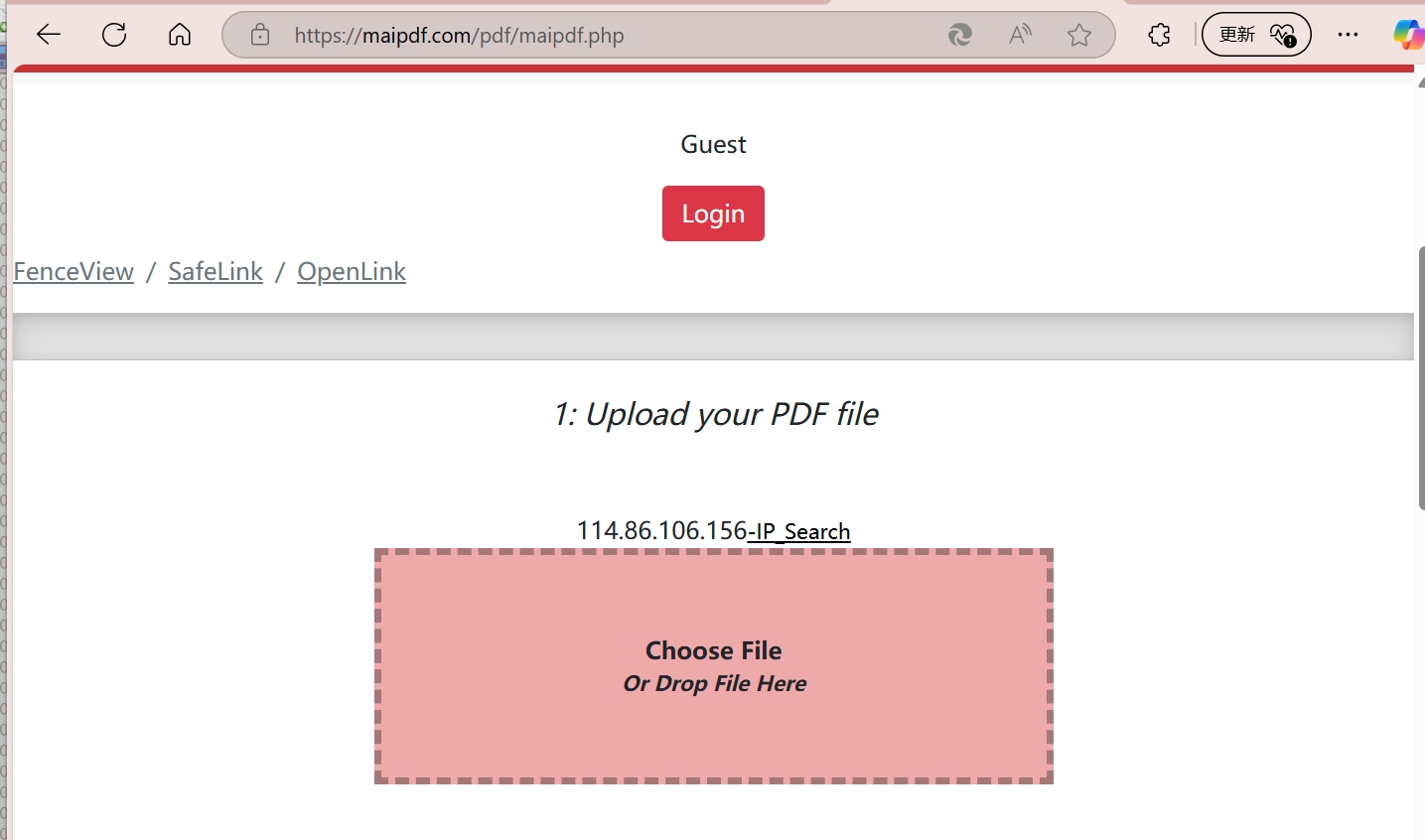
1 Upload Your PDF
Go to maipdf.com and upload your document. No account required for basic features.
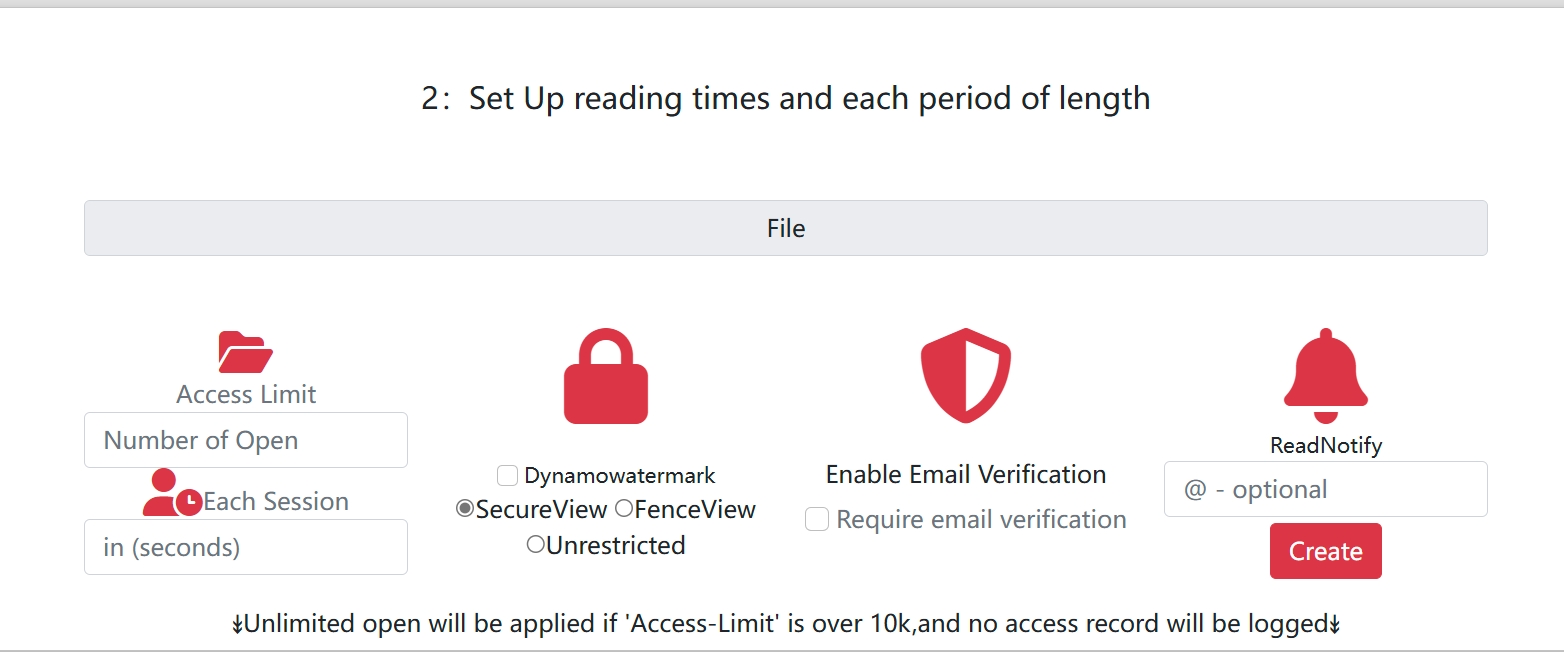
2 Configure Security Settings
On the settings page, enable the access controls you need:
- View limit: Set how many times the link can be opened (1 – 10,000)
- Expiration: Set an auto-expire date
- Password: Add a password requirement
- Email verification: Require email before viewing
- Watermark: Enable dynamic viewer-specific watermarks
- Download prevention: Disable the download button
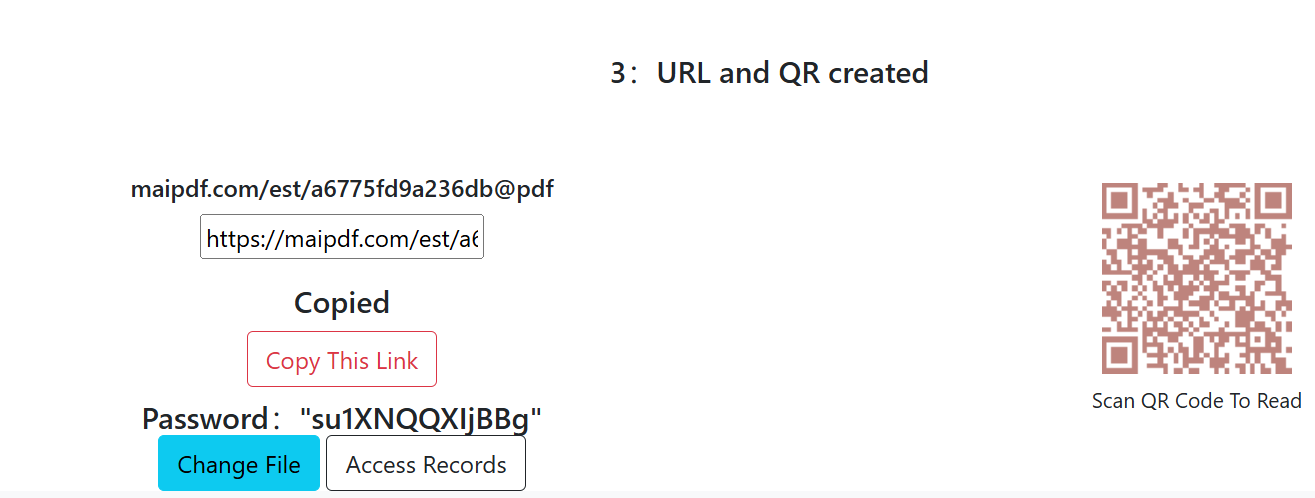
3 Generate Your Controlled Link
Click generate to get a shareable link and optional QR code. Share via email, chat, or embed in your website.
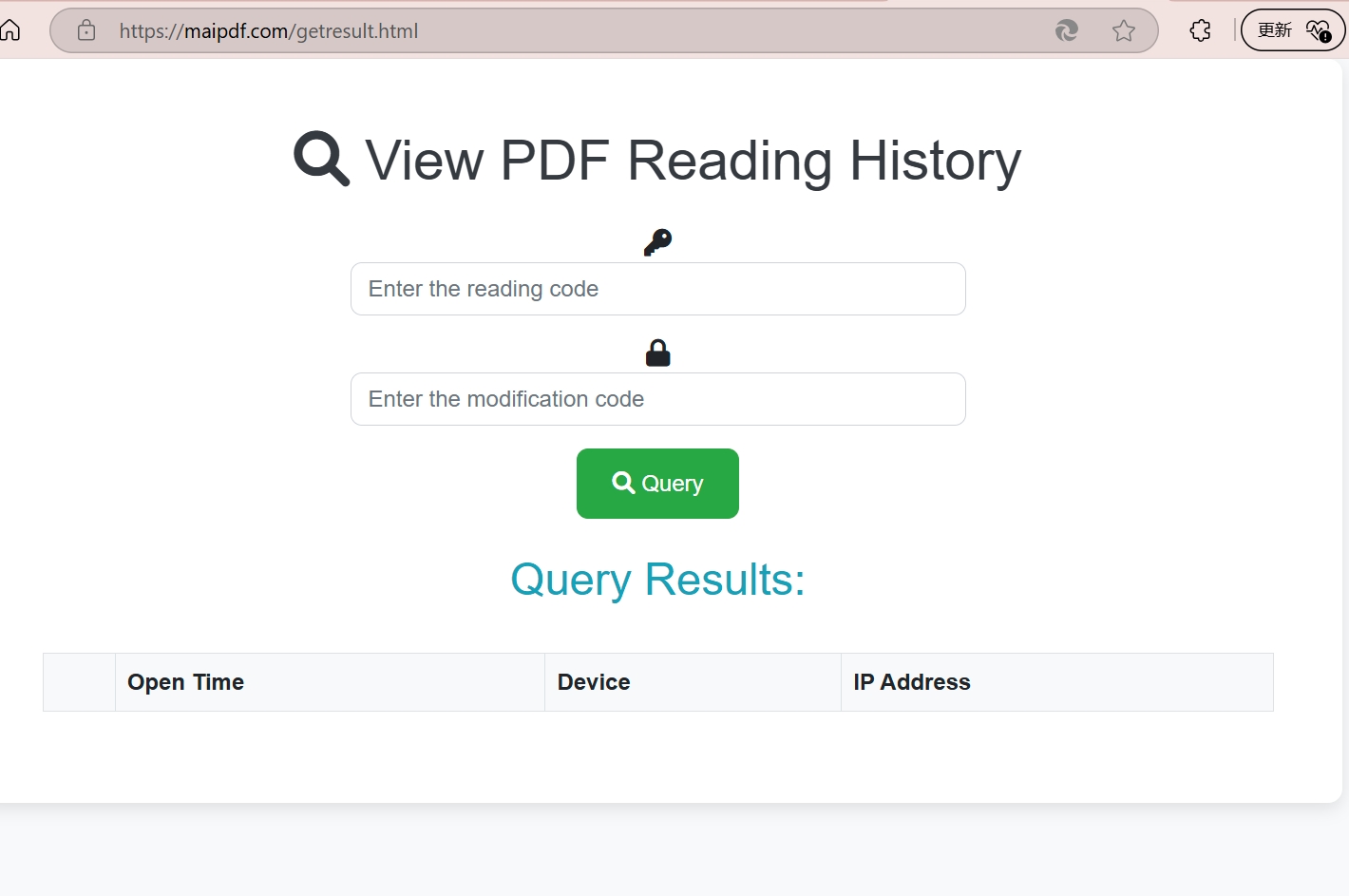
4 Monitor Access
Track who viewed your document, when, and how many views remain. Learn about PDF analytics in our tracking guide.
Access Control for Compliance
If your organization handles regulated data, PDF access control isn't just convenient — it may be legally required. Here's how access control maps to common compliance frameworks:
| Requirement | GDPR | HIPAA | SOC 2 | How Access Control Helps |
|---|---|---|---|---|
| Data minimization | View limits ensure documents aren't accessible indefinitely | |||
| Access logging | Email verification creates identity-verified audit trail | |||
| Right to erasure | Revoke link access instantly; document never downloaded | |||
| Encryption in transit | Link-based sharing uses HTTPS; no unencrypted attachments | |||
| Minimum necessary | Time-limited access ensures data isn't retained beyond need | |||
| Access controls | Multi-layer restrictions (password + email + limits) |
Industry Scenarios
Legal: Client Document Review
A law firm shares settlement documents with opposing counsel. Settings: email verification (identity audit trail) + 5 view limit (prevent unlimited access) + dynamic watermark (deter leaks) + 14-day expiration (auto-cleanup after negotiation period).
Result: Clear compliance record showing exactly who accessed what, when, with automatic expiration.
Finance: Investor Updates
A startup sends quarterly financial reports to investors. Settings: email verification (restricted to verified investors) + view limit of 10 + download disabled. The founder can see which investors actually read the report. Read more about secure investor update delivery.
Result: Investors get frictionless access, founder gets engagement data, material is non-public.
HR: Offer Letters & Performance Reviews
HR shares sensitive compensation documents with individual employees. Settings: email verification (locked to the employee's email) + 3 view limit + 30-day expiration + dynamic watermark (employee's name overlaid).
Result: Only the intended employee can view the document, with forensic traceability if leaked.
Publishing: Review Copies
A publisher sends pre-release manuscripts to reviewers. Settings: view limit of 20 + download disabled + dynamic watermark (reviewer's name) + expiration after review deadline. See our ebook preview use case.
Result: Reviewers can read thoroughly, but every page is forensically traced to them.
Education: Exam Papers & Course Materials
A university shares exam papers with invigilators 24 hours before the exam. Settings: password protection + email verification (only authorized staff) + expiration after exam day + download disabled.
Result: Exam security maintained until the test, automatic cleanup afterward.
5 Common Access Control Mistakes
Relying Only on PDF Passwords
PDF passwords are embedded in the file and can be shared, brute-forced, or removed with free tools. They provide a false sense of security. Always pair with server-side controls.
Setting View Limits Too Low
A 1-view limit sounds secure, but at recipients accidentally close the tab or experience connection issues, they're locked out. Set at least 3-5 views for a good balance of security and usability.
Forgetting to Set Expiration
A link with a 100-view limit but no expiration is still accessible months later. Always combine view limits with an expiration date for defense in depth.
Not Monitoring Access Logs
Setting up controls is only half the job. If you never check who actually accessed the document, you're missing unauthorized access attempts. Review analytics regularly, especially for sensitive documents.
Using Different Tools for Different Documents
Spreading documents across email, Google Drive, Dropbox, and specialized tools creates blind spots. Consolidate sensitive document sharing through a single platform with consistent access controls.
Start Controlling Your PDF Access — Free
Upload a PDF, set your access rules, and share a controlled link. No account required.
Try MaiPDF NowFrequently Asked Questions
What is PDF access control?
PDF access control is a set of methods that restrict who can view, download, print, or forward a PDF document. Instead of sending an unprotected file, you share a controlled link with restrictions like view limits, password protection, email verification, expiration dates, and IP restrictions.
How do I restrict how many times a PDF can be opened?
Upload your PDF to a service like MaiPDF, set a view limit (e.g., 5 views), and share the generated link. After the limit is reached, the link automatically becomes inaccessible. You can adjust or revoke the limit at any time. See our detailed guide on limiting PDF access times.
Can I control PDF access without requiring software installation?
Yes. Link-based access control solutions like MaiPDF work entirely through web browsers. Recipients click a link to view the PDF — no plugins, apps, or accounts required. All access restrictions are enforced server-side.
Is PDF access control GDPR compliant?
PDF access control supports GDPR compliance by limiting who can access personal data, providing audit trails, enabling automatic expiration, and giving you the ability to revoke access. However, full GDPR compliance also requires proper data processing agreements, privacy policies, and organizational measures.
What's the difference between PDF passwords and link-based access control?
PDF passwords are embedded in the file and can be shared or cracked. Once someone has the password, you can't revoke their access. Link-based access control is enforced server-side — you can set view limits, expiration dates, and revoke access instantly without needing to recall the file.
Can I track who accessed my controlled PDF?
Yes. Link-based PDF access control systems provide analytics showing when the document was viewed, how many times, from which devices and locations, and whether the viewer passed email verification. Read our PDF tracking guide for details.