Why Send PDFs Online? The Modern Approach to Document Sharing
In today's digital-first world, sending PDFs online has become the preferred method for document distribution. Unlike traditional email attachments that face size limitations and security concerns, online PDF sending offers a comprehensive solution for businesses and individuals alike.
According to recent studies, over 85% of businesses now use online document sharing platforms instead of email attachments for sensitive documents. This shift is driven by the need for better security, tracking capabilities, and user experience.
Key Benefits of Online PDF Sending
- No File Size Limitations: Send large PDF files without worrying about email attachment limits. Most email providers restrict attachments to 25MB, but online platforms can handle files up to several gigabytes.
- Enhanced Security: Advanced encryption, password protection, and access controls ensure your documents remain secure throughout the sharing process.
- Real-time Delivery Tracking: Know exactly when your PDF is accessed, by whom, and for how long. This is crucial for business communications and legal documents.
- Advanced Security Controls: Set expiration dates, view limits, download restrictions, and watermark protection to maintain control over your documents.
- Comprehensive Analytics: Monitor document usage, track viewer engagement, and gain insights into how your PDFs are being consumed.
- Better User Experience: Recipients can view PDFs directly in their browser without downloading, making it more convenient and mobile-friendly.
- Cost-Effective: Eliminate the need for expensive file transfer services or enterprise email solutions.
Statistics: The Growing Trend
85%
of businesses prefer online sharing over email attachments
3x
faster document delivery compared to traditional methods
90%
reduction in security incidents with online platforms
Professional PDF Sending Methods
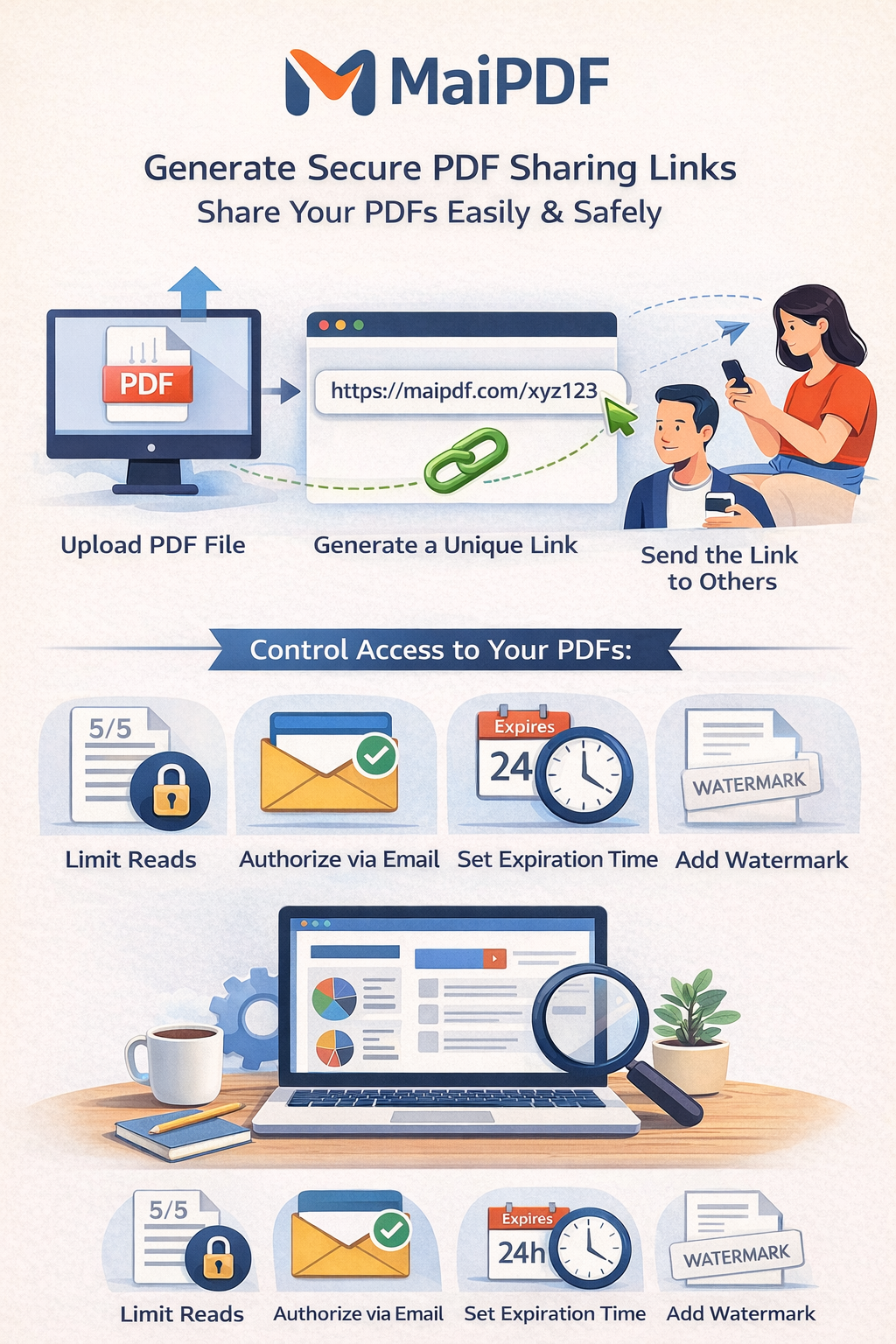
MaiPDF provides enterprise-grade methods for sending PDFs with comprehensive security and tracking capabilities.
Secure Email Sending
Send PDFs through encrypted email links with advanced security controls
- Encrypted delivery
- Access tracking
- Delivery confirmation
Secure Link Sharing
Generate encrypted sharing links with comprehensive access control
- Password protection
- Time restrictions
- View limits
QR Code Transfer
Create secure QR codes for instant mobile access and offline sharing
- Mobile-friendly access
- Offline distribution
- Print-ready codes
How to Send PDFs Online: Step-by-Step Guide
Follow this comprehensive guide to send your PDFs online securely and efficiently using MaiPDF's advanced platform.
-
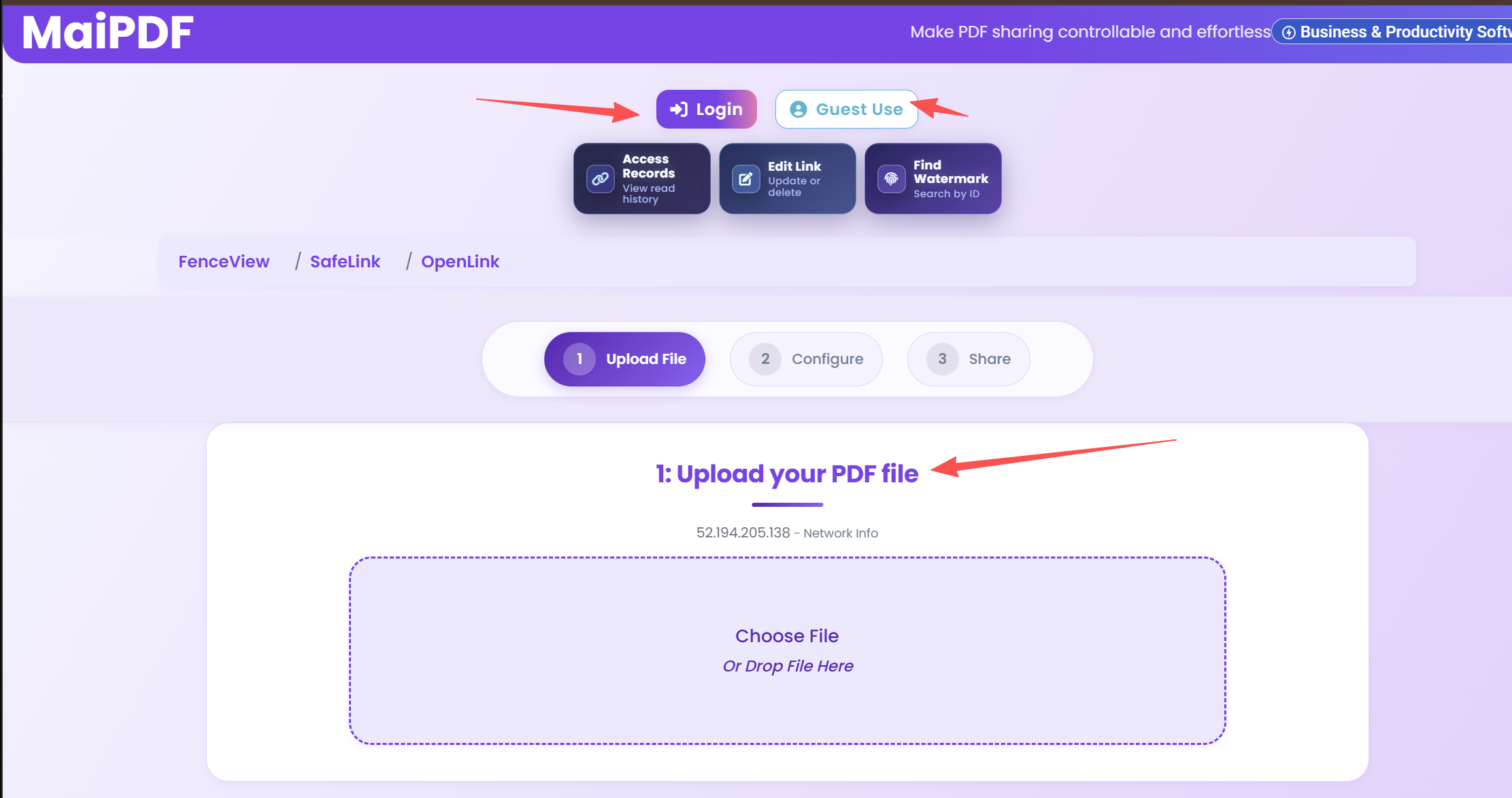
Upload Your PDF to MaiPDF
Start by visiting MaiPDF and uploading your PDF file. The platform supports all standard PDF formats and files up to several gigabytes in size. No registration is required - simply drag and drop your file or use the upload button. The upload process is encrypted and secure, ensuring your document remains protected from the moment it enters the system.
-
Choose Your Sending Method
MaiPDF offers multiple sending methods to suit different needs:
- Secure Link Sharing: Generate an encrypted link that you can share via email, messaging apps, or any communication channel.
- QR Code Generation: Create a scannable QR code perfect for printed materials, presentations, or offline distribution.
- Email Integration: Send PDFs directly through the platform with built-in email functionality.
-
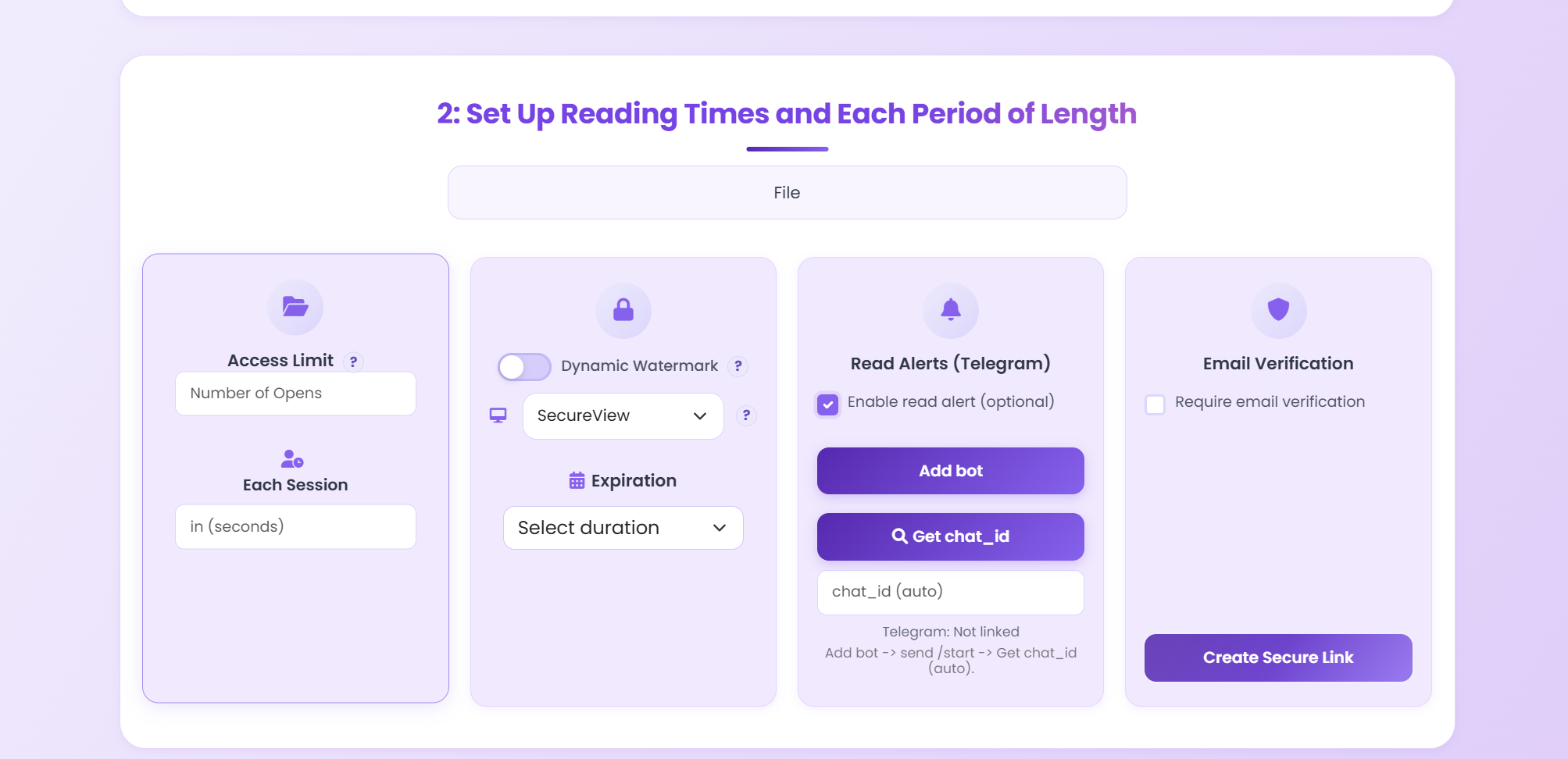
Configure Security Preferences
This is where MaiPDF truly shines. Set up comprehensive security controls:
- Password Protection: Require a password for document access, ensuring only authorized recipients can view your PDF.
- View Limits: Restrict the number of times the PDF can be viewed, preventing unauthorized distribution.
- Expiration Dates: Set automatic expiration so the link becomes invalid after a specified date or time.
- Download Restrictions: Prevent recipients from downloading the PDF, forcing them to view it online only.
- Watermark Protection: Add dynamic watermarks that display the viewer's information, deterring unauthorized sharing.
- Email Verification: Require recipients to verify their email address before accessing the document.
-
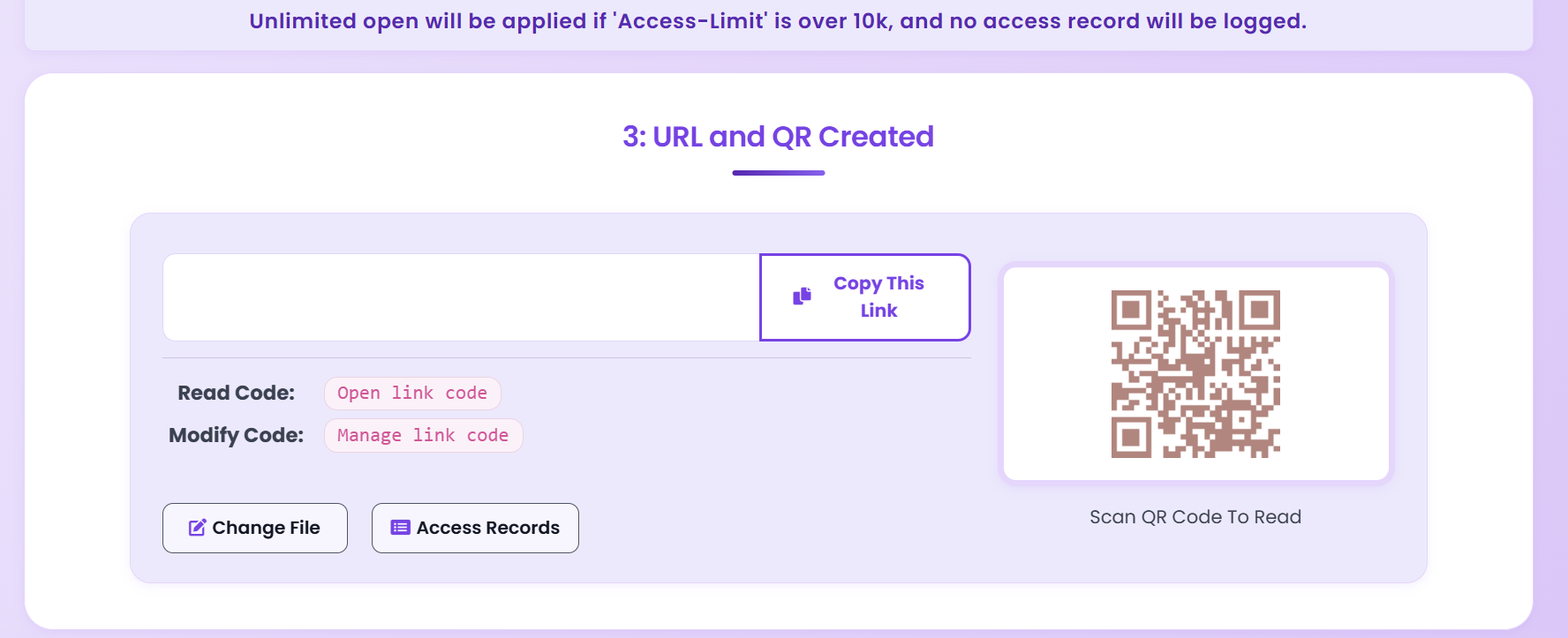
Generate Sending Link or QR Code
Once your security settings are configured, MaiPDF generates a unique, encrypted link or QR code. The link is cryptographically secure and cannot be guessed or brute-forced. For QR codes, you can download a high-resolution image suitable for printing on business cards, flyers, or presentation materials.
-
Share with Recipients
Distribute your secure link or QR code through your preferred communication channel. Recipients can access the PDF instantly without any software installation. The platform tracks all access attempts, providing you with detailed analytics about who viewed your document and when.
Pro Tips for Effective PDF Sending
- Test Your Link First: Always test the sharing link yourself before sending it to recipients to ensure all security settings work as expected.
- Use Descriptive Passwords: If using password protection, share the password through a separate, secure channel (not in the same email as the link).
- Set Realistic Expiration Dates: Consider your recipients' needs when setting expiration dates - too short may frustrate users, too long may compromise security.
- Monitor Access Regularly: Check your analytics dashboard regularly to identify any suspicious access patterns or unauthorized attempts.
- Use Watermarks for Sensitive Documents: Dynamic watermarks are particularly effective for confidential business documents, as they create a clear audit trail.
Advanced Security Features for Online PDF Sending
MaiPDF provides enterprise-grade security features that go far beyond basic password protection. These features are essential for businesses handling sensitive documents, legal files, financial reports, or confidential client information.
Password Protection
Implement strong password requirements to ensure only authorized users can access your PDFs. MaiPDF supports complex password policies and can generate secure passwords automatically.
- Custom password requirements
- Automatic password generation
- Separate password sharing channel
Time-Based Controls
Set precise expiration dates and viewing time limits to maintain control over document access duration.
- Automatic link expiration
- Viewing session time limits
- Customizable expiration policies
Download Restrictions
Prevent unauthorized downloads by forcing online-only viewing. This is crucial for protecting intellectual property and confidential information.
- Disable download functionality
- Prevent printing
- Block screenshot attempts
Dynamic Watermarking
Add dynamic watermarks that display viewer information, creating a strong deterrent against unauthorized sharing.
- User-specific watermarks
- Timestamp information
- IP address tracking
Comprehensive Access Tracking & Analytics
MaiPDF provides detailed analytics that help you understand how your PDFs are being accessed and used:
- View Tracking: See exactly when and how many times your PDF was accessed
- User Identification: Track who viewed your document (when email verification is enabled)
- Geographic Data: Monitor access locations to identify suspicious patterns
- Device Information: Know what devices and browsers are being used
- Engagement Metrics: Track time spent viewing, pages viewed, and scroll depth
- Access History: Complete audit trail of all access attempts
Use Cases: When to Use Each Security Feature
Business & Enterprise Documents
For sensitive business documents like contracts, financial reports, or strategic plans:
- Enable password protection + email verification
- Set strict view limits (e.g., 1-3 views per recipient)
- Add dynamic watermarks with user information
- Disable downloads to prevent unauthorized distribution
- Set expiration dates aligned with project timelines
Educational Materials
For course materials, research papers, or educational content:
- Use time-based expiration (e.g., semester end)
- Allow downloads but track all access
- Implement view limits to prevent sharing
Personal Documents
For personal portfolios, family documents, or creative work:
- Basic password protection
- Optional watermarks for portfolio protection
- Flexible expiration dates
Common Questions About Sending PDFs Online
Is it safe to send PDFs online?
Yes, when using a reputable platform like MaiPDF with proper security settings. The platform uses end-to-end encryption, secure servers, and advanced access controls to protect your documents. Always enable password protection and set appropriate expiration dates for sensitive documents.
What's the maximum file size I can send?
MaiPDF supports PDF files up to several gigabytes, far exceeding email attachment limits. The exact limit depends on your plan, but even free accounts can handle files much larger than traditional email allows.
Can recipients download the PDF?
You have full control over this. You can enable or disable downloads based on your security needs. For maximum security, disable downloads and force online-only viewing with watermark protection.
How long do shared links remain active?
You control the expiration date. You can set links to expire after a specific date, after a certain number of views, or never expire. For sensitive documents, we recommend setting expiration dates aligned with your project timeline.
Do I need to create an account?
No! MaiPDF allows you to send PDFs online without registration. However, creating a free account gives you access to advanced analytics, document management, and extended storage options.
More Resources from MaiPDF Blog
Discover more in-depth guides and tutorials on our official blog at article.maipdf.com
Blog Post
Complete guide to protecting your PDFs with latest security techniques.
Blog Post
Learn how dynamic watermarks protect intellectual property.
Blog Post
Leverage PDF analytics to improve engagement and close deals.
Ready to Send Your PDFs Securely and Free?
Join thousands of users who trust MaiPDF for secure document sharing. Get started in seconds - no registration required, no credit card needed, completely free to use.
100% Free • No Registration • Enterprise Security